

WE DON’T DO SPAM FOLDERS Nyx’s inbox override
Don’t Let A Filter Decide What You Read.
Since your Email Provider probably uses some type of overzealous filtering; We ask that you add us to your trusted list of senders, contacts or address book. All also known as “Whitelisting.”
If you do not see an email from Venomous Sin in your Inbox, my email may have mistakenly been sent to your spam folder.
Please open your spam folder and if you find an email from Venomous Sin open it and mark it as “Not spam”...
NEXT: Click your provider below to Whitelist band@venomoussin.com

Choose Your Email App
Click your email service, mobile app, desktop client, security suite, or spam filter to load the exact whitelist steps below.
Popular Apps
Email Clients
Security Apps
Spam Filters
Gmail
At times, Gmail mistakenly sends emails you want, to the Spam folder...
If you do not readily find an email from Venomous Sin
Please check your Gmail Spam Folder:
To assure you continue to get emails you asked to receive, Create a Filter
- If you find an email from Venomous Sin in Gmail spam?
- Open the email please.
- Click 'Dots' button on the top right, to reveal your choices.
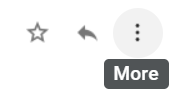
Click Filter messages like this
Reply
Forward
Filter messages like this
Click the button Create filter to open your settings.
From the next menu, please check these options
Never send it to Spam
Always mark it as important
Also apply filter to matching conversations
Categorize as: Choose Category...
Under the "Categorize as: Choose Category..."
- Click the dropdown icon next to "Choose Category..."
- Please select Primary in the next options menu.
Choose Category...
Primary
Social
Updates
Forums
Promotions
Click the blue Create filter button, to save your settings
Now you will always see Venomous Sin in your Primary Inbox tab!
Next, if the email remains open? Please mark the email as "Not spam"
- If you see an email from Venomous Sin: Open the email please.
- Click the button on the alert, labeled Report Not spam

Gmail Tabs
- If you are using Gmail Tabs such as 'Promotions' please open your Promotions tab in Gmail.
- If you find an email from Venomous Sin in your Gmail Promotions tab:
- Grab and drag my email to the Primary Inbox Tab.
- After doing so, you will receive an alert like the one below at the top of your Gmail toolbar.
Conversation moved to Primary. Do this for future messages from band@venomoussin.com?
- Click Yes in the black alert box at Gmail.
- This way you will always see Venomous Sin in your Primary Inbox tab...
Also you can create a filter...
- If you find an email from Venomous Sin in your Gmail Promotions tab:
- Open the email please.
- Click the dots menu on the top left of the email.
Click Filter messages like this.
Reply
Forward
Filter messages like this
Click the button Create filter to open your settings.
Please select Primary in the next options menu.
Choose Category...
Primary
Social
Updates
Forums
Promotions
Click the blue Create filter button, to save your settings
Now you will always see Venomous Sin in your Primary Inbox tab...
Gmail Mobile App
If you are using the Gmail Mobile App on your mobile device, please open the app now
Should you not readily see an email from Venomous Sin, please check the Spam Folder:
Should an email from Venomous Sin appear mistakenly sent to Gmail spam?
Please open the email and Tap the 
Move to
Snooze
Change labels
Mark as not important
Select "Change labels..."
Check the box next to Inbox
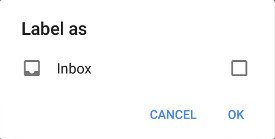
Tap OK to save your settings
Are you are using Gmail Tabs such as "Promotions" please open your Promotions tab in Gmail.
- When you find the email from Venomous Sin
- Tap the
- Then select Move to.
Move to
Snooze
Change labels
- Then select Primary from the list.
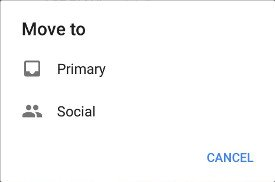
This should help Gmail to know, you always want to see Venomous Sin in your Primary Inbox tab...
Yahoo! Mail
If you do not see an email from Venomous Sin in your Inbox...
Check your Spam Folder. If an email from Venomous Sin is there?
- Please open the email.
- Next click the Not Spam button on the top toolbar.
To ensure delivery: Create a filter to automatically send email from Venomous Sin to your Inbox.
- Move your mouse over or tap the Gear icon in the top right navigation bar.
- Select Settings from the list that drops down.
- Choose Filters located on the left side of the page.
- Click the Add button on the Filters page.
- Create a name such as Whitelist in the Filter name field.
- In the From field leave the default contains selected.
- Enter our email address band@venomoussin.com in the text box next to Contains...
- Choose the destination folder to which you would like the message delivered. For example: Inbox.
- Click or tap Save...
- You will see in the next screen -Deliver to Inbox if From contains Venomous Sin-
- Click or tap Save on this screen.
- You will be returned to your Yahoo! Inbox.
iPhone Mail App
iPhone Mail identifies most junk mail (spam) sent to your @icloud.com address or aliases, but it can mistakenly move email incorrectly to your Junk mail folder.
Periodically check the Junk folder for email messages that were marked as junk mistakenly.
To indicate that an email message from Venomous Sin isn’t junk:
- Open your Mail app and go to the Mailboxes screen
- Scroll down to the folders area
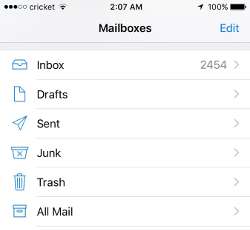
- Select the Junk folder.
- Find the email from Venomous Sin and slide it left to see options.
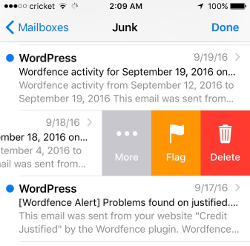
- Tap the More button.
- Tap the Mark button.
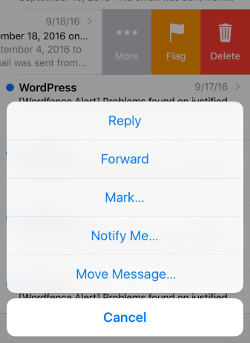
- Tap the Mark as Not Junk button.
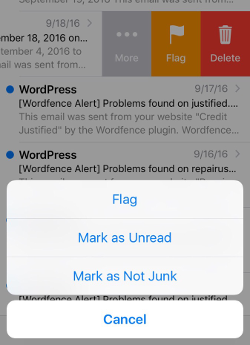
The message is moved to your Inbox. Subsequent email messages from Venomous Sin will no longer be marked as junk.
By default, messages in the Junk folder are deleted after 30 days so be sure to check it often to whitelist relevant email.
Outlook Mobile App
Outlook's mobile app now offers a "Focused Inbox" for your important email
- To add Venomous Sin to your list of Focused Inbox on the Outlook App...
Please open the mobile Outlook app on your Android, Microsoft or iPhone:
Then open the email from Venomous Sin:
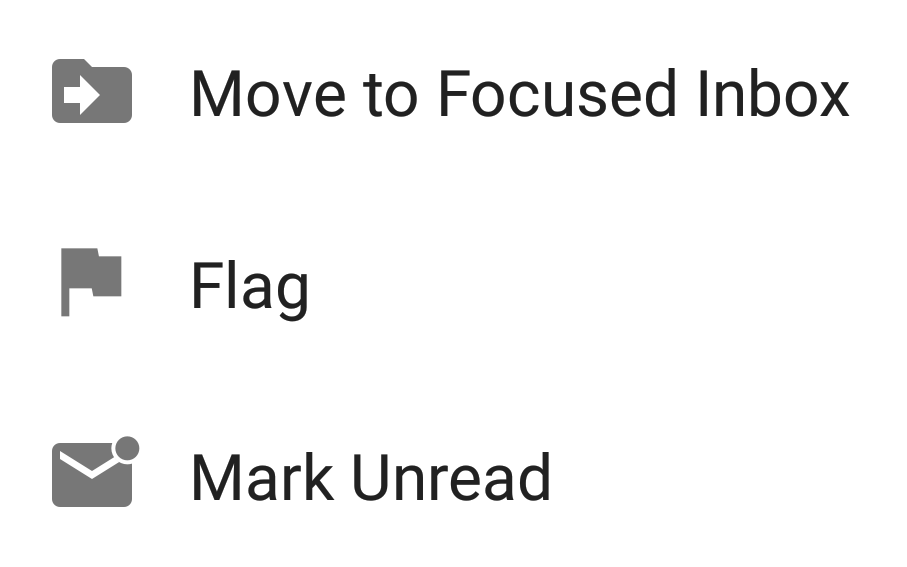
- Click the dropdown menu

- On the menu displayed tap Move to Focused Inbox
- Select the Move this and all future messages button.
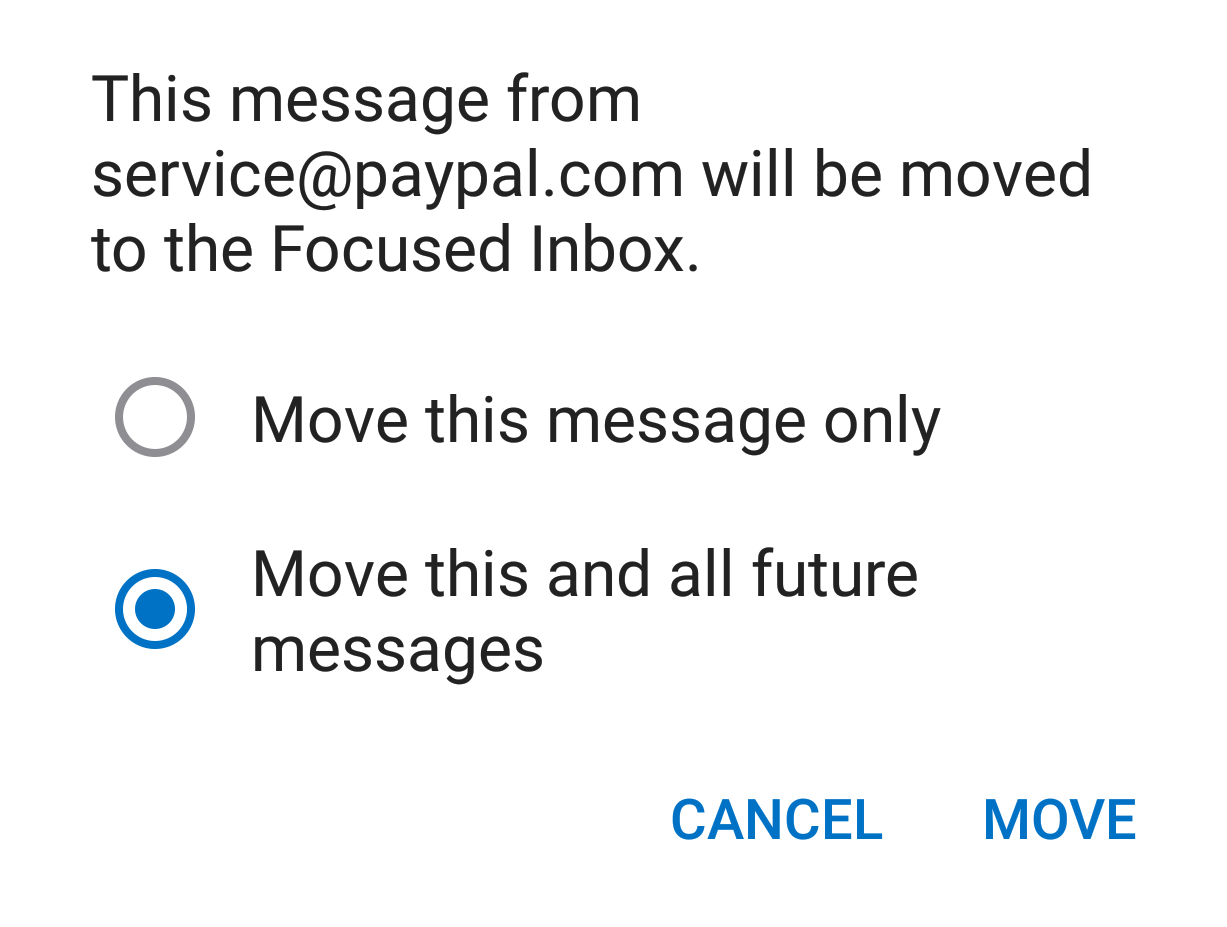
- Tap Move
- Now all future messages from Venomous Sin will appear in your Focused Inbox
You can also remove unwanted emails from your Focused Inbox as well by repeating this process in your Focused tab.
Outlook 2003, Outlook 2016 and Outlook Office 365
To ensure you continue to receive important emails in Outlook Office:
Please add Venomous Sin to your list of "Safe senders" on Outlook:
- Right click our email in your Inbox email list pane.
- On the menu displayed move your mouse over or tap Junk
- Click or tap on Never block sender in the menu that rolls out.
- The resulting popup will say:
- "The sender of the selected message has been added to your Safe Senders List."
- Click OK
To add sender to address book:
- Open the email
- Right click on the from address
- Choose Add to contacts option
Outlook.com
Previously "Hotmail", "Live", "Windows Live" and "MSN"...
In the new Outlook.com you must click the Wait it's safe link if you find emails incorrectly identified as spam.
Entering the email contact in the address book or contacts no longer whitelists the sender.
To ensure messages from specific email addresses are not sent to your Junk Email folder, you can do one of two things:
- Check the Junk folder. If you see the Venomous Sin email in your Inbox
- Open the email from Venomous Sin...
- Click the "Wait it's safe" link
Mark Sender as "Wait it's safe!
Venomous Sin (band@venomoussin.com)
To: you@outlook.com
Microsoft SmartScreen marked this message as junk and we'll delete it after ten days.
Manually Add to Safe List
- Click gear the icon on the top right.
- Select Options in the drop down list.
- On the Options page under Preventing junk email click Safe and blocked senders
- Click the link Safe senders on the next page.
- Enter the email address band@venomoussin.com in the text box.
- Click Add to list
- Venomous Sin will now be added to your list of Safe senders
- Emails added to your Safe senders will not be delivered by mistake to your Junk folder.
AOL Webmail
To ensure important emails get delivered to your AOL Inbox- Please complete these two steps...
If you find Venomous Sin in your spam folder:
- Right click the email.
- Click "Not spam" in the resulting list.
Add band@venomoussin.com to your Address Book:
- Open the email from Venomous Sin
- Click the show details link next to Venomous Sin in the From field.
- Move your mouse over or tap band@venomoussin.com to show the menu.
- Click or tap Add contact in the menu displayed.
- Add Venomous Sin to the name fields
- Click Add contact
Next: Please Enable Images
- By default AOL now blocks all images.
- Open the email from Venomous Sin please.
- Click Don't block this sender please.
- Now you will see our complete emails with no effort on your part...
Email from that Domain will now be delivered straight to your Inbox.
Comcast
Please log into your Xfinity account and select your Comcast webmail:
- Should you find an email from Venomous Sin in your spam folder:
- Open the email.
- Click the

Next please, add Venomous Sin to your address book:
- Please open the email from Venomous Sin.
- Click on the button at the top left of the email that says:
band@venomoussin.com
+ Add to Address Book
- That will open your edit contact screen.
- Then click Save and you're all done.
EarthLink
If you are not receiving email at EarthLink, there are two actions you can take.
- Check Suspect Email folder
- Add Venomous Sin to your address book.
With EarthLink, if you have SpamBlocker turned on, suspect messages are automatically send to your Suspect Email folder if the Domain is not in your address book.
Suspect Email Folder:
- While in the Suspect Email folder, if you see Venomous Sin...
- Select the Move to Inbox and Add Contact option from the drop down menu.
- This will add band@venomoussin.com to your Address Book for future email delivery assurance.
Address Book Inclusion:
- Open the email.
- Click Add to Address Book in the email header.
- Use the Address Book Editor to verify the sender's contact details and click save.
- Fill in band@venomoussin.com as the email address of the sender.
- Any mail sent with the same Domain (right of the @ sign) will now be delivered to your Inbox.
AT&T
AT&T no longer maintains their own inbox.
Instead you can find your AT&T emails at Att.Yahoo.com
Please follow the Yahoo instructions for whitelisting an ATT.net email address.
Click or Tap here, to scroll to the Yahoo instructions...
Mozilla Thunderbird
Please open your Thunderbird email client:
If an email from Venomous Sin appears in your Junk Folder:
Please mark that message as Not Junk.
Next, please add Venomous Sin to your Address Book:
- Click the Address Book button.
- Make sure the Personal Address Book is highlighted.
- Click the New Contact button.
- Under the Contact tab, copy and paste the "From" address, band@venomoussin.com into the email text box.
- Click OK.
Norton AntiSpam
This problem may occur if band@venomoussin.com is accidentally added to the Blocked List.
To remove the band@venomoussin.com from the Blocked List:
- Start your Norton product.
- Click Settings.
- Depending on your Norton product, do one of the following:
For Norton 360:
- In the Settings window, under Detailed Settings, click AntiSpam.
- On the Filter tab, next to Blocked List, click Configure.
For Norton Internet Security:
- In the Settings window, on the Network tab, click Message Protection.
- Under AntiSpam, next to Blocked List, click Configure.
- In the Blocked List window, select the item that you want to remove, and then click Remove.
- Click Apply, and then click OK.
- If you do not find band@venomoussin.com in the Blocked list, go to next step.
To add band@venomoussin.com to the Allowed List:
- Start your Norton product.
- Click Settings.
- Depending on your Norton product, do one of the following:
For Norton 360:
- In the Settings window, under Detailed Settings, click AntiSpam.
- On the Filter tab, next to Allowed List, click Configure.
For Norton Internet Security:
- In the Settings window, on the Network tab, click Message Protection.
- Under AntiSpam, next to Allowed List, click Configure.
- In the Allowed List window, click Add.
- In the Add Email Address window, from the Address Type drop-down, select the address type.
- Add band@venomoussin.com, and then click OK.
- In the Allowed List window, click Apply, and then click OK.
McAfee Products
While McAfee has removed spam protection in the latest Anti-Virus software- You may still have a version that offers spam filtering.
- In order to add Venomous Sin to the friends whitelist, please open McAfee and click on Web & Email Protection.
- Then click on Anti-Spam
There you can see various settings. You can change the spam protection level, change filter settings, etc.
- Click on Friends list
- Please add band@venomoussin.com to your "Friends List" to always allow emails from Venomous Sin.
Trend Micro
If you received an email message from Venomous Sin that was incorrectly moved to the Spam Mail folder by the Anti-Spam Toolbar you can prevent this from occurring in the future
The Anti-Spam Toolbar detects spam by looking for certain keywords in the email's subject or body. Occasionally, it may detect what you consider legitimate email as spam.
To prevent this from occurring you can do either of the following:
- Add the Venomous Sin to the list of Approved Senders.
- Decrease the Spam Email Filter Strength.
Note: You can also select the email and click Not Spam to report it to Trend Micro. However, this feature serves only as a reference to their spam database, and it may not have an effect on how the toolbar detects spam.
Add the sender to the list of Approved Senders:
- Open Microsoft Outlook.
- Click the Spam Mail folder then select the legitimate email detected as spam.
- Click Approve Sender on the toolbar.
- Click Yes when the confirmation message appears.
Decrease the Spam Email Filter Strength:
- Open Microsoft Outlook.
- Click Trend Micro Anti-Spam then click Settings.
- On the Spam Filter tab, move the slider bar to select a lower filter strength.
- Click OK to save your settings.
Cloudmark SpamNet
Cloudmark filters email based on content footprints. To assure our email has not been mis-identified as spam:
- Select Cloudmark | Options... from the Cloudmark SpamNet toolbar in Outlook.
- Click Advanced.
- Go to the Whitelist tab.
- Click the Add button.
- Type: band@venomoussin.com
- Click OK.
- Click OK.
- Click Yes.
- Click OK.
SaneBox
Sanebox is not a filter, but a filtering system trained by you.
- Open your Webmail or Gmail where you use SaneBox.
- Open your @SaneLater folder.
- If you find an email from Venomous Sin or an email from band@venomoussin.com in @SaneLater...
- Please drag my email to your Inbox folder.
- By doing this you will always get our great content in your Inbox from now on!
Spam Assassin
Spam Assassin is usually administered by your server admin. Please contact your admin and request that he or she:
- Add the following entry to your user_prefs file, which is found in the .spamassassin subdirectory on your web/mail server
- whitelist_from band@venomoussin.com
- Save the user_prefs file or move the updated copy to your .spamassassin subdirectory.
Barracuda Networks
Occasionally, Barracuda Spam Firewall will mark a legitimate message as spam. There are two methods to whitelist email senders.
Whitelist Quarantined Senders:
- Open your email client. Barracuda should send you a summary each day listing quarantined items. Choose the most recent Barracuda email message.
- Locate the email from Venomous Sin and the sender email address band@venomoussin.com that you do not want quarantined in the future. Click on the word "Whitelist," which is in green print to the right of the email title. This will open your list in a web browser.
- Click the box to the left of the email that you would like to whitelist. At the top of the page, click "Whitelist." Barracuda will not block or quarantine the sender whose email address appears on the whitelist.
Whitelist Senders and Domains:
- Open your web browser. Navigate to your company's Barracuda firewall homepage.
- Click on the Block/Accept tab.
- Choose "Sender Domain Block/Accept." Enter the Domain name from band@venomoussin.com to whitelist. For example, you can enter aol.com to allow all AOL addresses.
- You may enter a comment to remind you why you allowed this Domain. Click "Add."
- Click your mouse on the "Email Sender Block/Accept" tab. Enter the email address of an individual sender that you want to whitelist, such as "band@venomoussin.com"
- Include a comment. Click "Add." In the future, Barracuda will not block emails from this sender.
Most Used Spam Filters
Select your spam filter application below to open its whitelist instructions for band@venomoussin.com:
SPAMfighter
Highlight the email from Venomous Sin with the email address band@venomoussin.com to Whitelist.
Click "More" in the SPAMfighter Toolbar and select "Whitelist".
Here you can choose if you want to Whitelist the email address band@venomoussin.com or the whole Domain.
To be sure that all emails from people in your Outlook contacts get through to you, you can import and Whitelist them.
To do this, follow these steps:
- Click "More" in the SPAMfighter toolbar.
- Then "Options"
- Then "Filter settings"
- Then "Blacklists & Whitelists"
- Then "Whitelist email address"
- Then "Import".
- Select your 'Address Book' and click on "Check all"
- Click "Add"
- Click "Apply"
If you get a pop-up box offering you to upgrade to SPAMfighter Pro, it is because you have exceeded the limit of 100 addresses. You can fix this by buying SPAMfighter Pro or by deleting some of the addresses in your Black/White list. If you want to delete addresses, please go to:
- Click More" in the SPAMfighter toolbar.
- Then "Options"
- Then "Filter settings"
- Then "Blacklists & Whitelists"
Mail Washer
- Click Tools, then Blacklist & Friends.
- Click Add... on the right, the Friends list side.
- Make sure Plain email address is selected.
- Type: band@venomoussin.com
- Click OK.
- Click OK.
ChoiceMail
- Open ChoiceMail
- Click on the Senders tab
- Choose "Approve another Sender"
- Type in the sender email address band@venomoussin.com
- Click on OK
Spam Sleuth
- Select File, then Configure.
- Go to the Friends category.
- Make sure Active is checked.
- Type: band@venomoussin.com on a line by itself in the entry field.
- Click OK.

Is Your Email Client Or Spam Filter Not Listed?
If Venomous Sin is being filtered, try adding band@venomoussin.com to your Address Book or Contact list.
If messages continue to be sent to your junk folder contact your ISP or spam filter application support and ask how to whitelist band@venomoussin.com
Venomous Sin is in no way associated with any of the brands, websites or applications quoted here. All Trademarks ® are the property of their respective owners.